Hands-On Tutorial: Letting Muse Register a US Apple ID for Me
A hands-on record of registering a US Apple ID with an AI Agent: the exact prompt, how to age the account through the 48-hour risk-control window.
Contents (6 sections)
Why You Might Need a Foreign-Region Apple ID
In the Chinese App Store, quite a few overseas AI apps are impossible to search for or download — to use them, you need a US (or other country/region) Apple ID. On top of that, App Store subscription prices differ from region to region: some overseas AI subscriptions are cheaper in foreign stores. For example, buying ChatGPT Plus on the App Store with a Turkey-region Apple account works out to a much better monthly price than going through mainland-China channels.
So whether you want to download an AI app that is only listed in the US store, or subscribe to AI services at a lower cost, a foreign-region Apple ID is the unavoidable first step. This tutorial records my complete hands-on process of using Muse as an agent to register a US Apple ID — the entire flow never asks you to manually fill in a single registration form.
Before You Start: Get Your Details Ready
An AI Agent can run the flow for you, but the personal details have to come from you. Have these items ready at hand before registering:
- Email: an email address that can receive verification messages (the key to a successful registration)
- Name in pinyin: your passport spelling or your usual romanization is fine
- Age and phone number: for account information and SMS verification
- Password: set it yourself, keep it to yourself
- Payment method: choose None — no card needs to be attached at the sign-up stage
Security reminder: submit these details only to an AI Agent session that you yourself are using. Anyone asking you to send your password to a “registration service” is dangerous — in this tutorial the entire registration happens inside your own AI session, and the credentials never leave your device.
Hands-On: One Prompt Completes the Registration
Open Muse and send it the registration task together with your details in one go. A sample template (I redacted the sensitive fields — fill in your own information):
Help me register a US-region Apple ID account. My details:
Email: your email
Name in pinyin: your name in pinyin
Age: your age
Phone: +86 your phone number
Password: a password you set yourself
Payment method: choose None
After you send the prompt, Muse starts executing the registration flow step by step. The first time it runs, it will request permission to access the network — choose “Always Allow” — that way the whole registration never needs repeated confirmations from you, and the Agent can run to the end in one go.
What a Successful Registration Looks Like
When the run finishes, Muse hands you a complete account receipt: the Apple ID email, name, region (United States), verification status (both email and SMS passed), and payment method (none attached, and no marketing subscriptions checked). Below is the actual receipt from my run (sensitive information redacted):
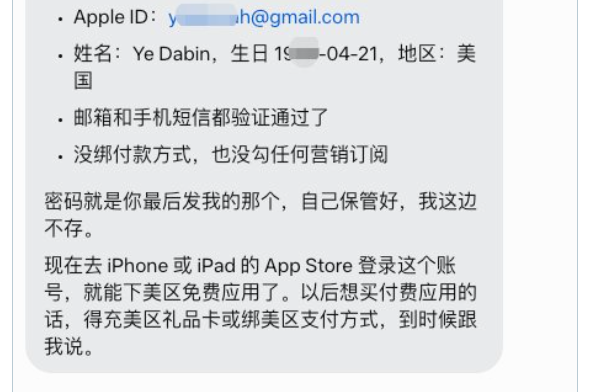
Once you have the receipt, log in with the new account in the App Store on your iPhone or iPad and you can download free US apps right away. Later, when you want to buy paid apps, handle it with US-region gift cards or by attaching a US payment method — just tell your AI Agent when the time comes.
Three Key Precautions
First, choose Always Allow for network permission. After you enter the prompt, Muse requests network access. Choose Always Allow, and the rest of the flow needs no manual clicks from you — the registration won’t be interrupted.
Second, and most critical: let the new ID age for 48 hours. After registering a US ID or a Turkey ID, do not immediately order paid subscriptions — first download a few free apps, use them normally for about 48 hours, and only then pay for and subscribe to paid apps. Ordering a paid subscription immediately after registration easily trips Apple’s risk control, and getting a restricted account sorted out again is a huge hassle. Slower is steadier.
Third, Muse is not the only one that can do this. Other mainstream AI Agents support the same flow, for example Grok’s Bot, ChatGPT’s Dot, Meta’s Muse, Manus’s Cue, Tencent’s LightVela, and Google’s Spark — the flow is identical and the prompt transfers directly.
A Word from the Site Owner
AI Agents will be a hot topic in Q4 2026 and an important direction in how AI iterates and upgrades. I come from a science background and worked as a programmer — no deep theory here. In my spare time I watch stand-up comedy and tell jokes. On this site I share hands-on AI Agent experience, and everyone is welcome to swap tips on using AI to earn a little money on the internet — every flow shared here was run through by my own hands; just follow along.
Note: this article is the site owner’s first-hand practice record; all personal details were redacted when compiling it. Apple’s registration flow and risk-control policies may change over time — when you operate, defer to Apple’s official pages and to your AI Agent’s actual feedback. This tutorial has nothing to do with crypto assets and is not investment advice.
FAQ
Do I have to use Muse?
No. Muse is simply the AI Agent the site owner used for this run; the same flow also works with Grok's Bot, ChatGPT's Dot, Meta's Muse, Manus's Cue, Tencent's LightVela, and Google's Spark — use whichever one you have at hand.
Can I subscribe to paid apps right after registering?
Better to wait about 48 hours. First download and normally use a few free apps with the new ID, then order paid subscriptions — it lowers the odds of tripping risk control.
What should I enter for the payment method?
Pick None and you can still finish registering. Later, when you want to buy paid apps, handle it with US-region gift cards or a US payment method — no card is needed at the sign-up stage.
Changelog
- Oct 6, 2026 First published: compiled from the site owner's hands-on material; all personal details in the demonstration were redacted.
Sources & data dates
- Apple Support: create an Apple ID on iPhone (sign-up flow and payment method notes) (in Chinese) · Accessed Oct 6, 2026
- Site owner's hands-on material (@yedabinbinah on X, 2026-10-06 practice log) · Accessed Oct 6, 2026
Translated from the Chinese original; the editorial review applies to the Chinese version.
yedabin Reviewed
A programmer with a science background, former trading-platform engineer, and stand-up comedy fan. Proudest moment: bought 8 BTC for RMB 4,000.
Every factual statement cites sources and access dates. Pages carrying the “Reviewed” badge were checked line by line by a human before publishing.
Reviewed by yedabin (Oct 6, 2026)